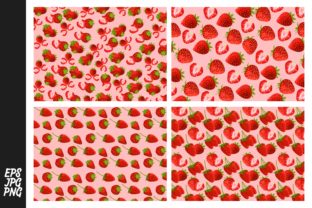
Strawberry Pattern Bundle
The Strawberry Pattern Bundle is a ready-to-use digital asset collection designed for creators who need consistent, high-quality surface patterns without the time investment of designing from scratch. It’s not just decoration—it’s a functional component in visual workflows where repetition, scalability, and brand-aligned aesthetics matter. Whether you’re preparing packaging mockups, building a Shopify theme, illustrating an educational worksheet, or designing social media templates, this bundle delivers flexibility across stages of execution.
What’s Inside—and Why Format Choice Matters
This download includes three essential file formats: JPG, EPS, and PNG. Each serves a distinct role in real-world use:
- JPG offers fast previewing, web embedding, and compatibility with nearly every platform—from Canva to PowerPoint. Use it for quick mood boards, client presentations, or low-stakes internal drafts where transparency or vector editing isn’t required.
- PNG retains transparency and sharp edges, making it ideal for overlaying on photos, adding patterned accents to blog headers, or integrating into UI kits. Its lossless compression preserves detail without bloating file size—critical when optimizing for speed and accessibility.
- EPS is the foundation for scalable, print-ready work. Designers open it in Adobe Illustrator or Affinity Designer to recolor, resize infinitely, or extract individual motifs. If your project involves custom textile printing, branded stationery, or large-format signage, EPS ensures fidelity at any dimension.
Having all three formats in one bundle eliminates format-hopping mid-project. You don’t need to convert files or risk quality loss—you select the right version for the task at hand, then move forward.
Where It Fits in Your Workflow
Think of the Strawberry Pattern Bundle as a plug-in resource—not a standalone solution. Its value emerges most clearly when aligned with specific workflow phases:
Before a Project: Streamlining Planning and Scoping
When briefing a designer or preparing a pitch deck, using these patterns early builds visual consensus. Drop a JPG into a Figma wireframe or Notion brief to communicate tone and texture before committing to custom design hours. Educators can preview how strawberry motifs will appear on printable flashcards or classroom posters—adjusting layout spacing or contrast based on actual pattern density, not guesswork.
During Execution: Supporting Consistency and Speed
Freelancers juggling multiple clients benefit from having a trusted pattern library. Instead of re-creating similar berry-themed repeats for each brand refresh, you apply the Strawberry Pattern Bundle as a base layer—then tweak colors or scale in Illustrator (via EPS) to match brand guidelines. Marketers building email campaigns use PNGs to add subtle background texture behind CTAs without slowing load times. Small business owners updating Etsy listings drop JPGs directly into product mockups—no waiting for assets to render or export.
After Delivery: Enabling Iteration and Repurposing
Once a campaign launches or a product ships, the same assets support follow-up work. A blogger who used PNGs for Instagram carousels can reuse the EPS in a printable planner kit—extracting single strawberries to build icons or borders. Publishers include JPG previews in sales decks while delivering EPS source files to production teams for final print runs. That dual-purpose structure reduces redundant labor and keeps versions aligned over time.
Integration With Other Tools and Assets
The Strawberry Pattern Bundle works best when treated as part of a larger toolkit—not isolated from your existing systems. Here’s how it connects:
- With color systems: Open the EPS in Illustrator and use Global Swatches to shift the entire pattern to match your brand palette—no manual recoloring of layers.
- With typography: Layer PNGs beneath headline text in Canva or Figma to create depth, then adjust opacity so readability remains uncompromised.
- With photo assets: Use the transparent PNG to frame product photography—place strawberries along borders or corners to guide the eye without competing with the main subject.
- With CMS platforms: Upload JPGs to WordPress media libraries for lightweight background images; store EPS files separately in cloud folders (e.g., Google Drive or Dropbox) labeled “Source Assets” for future edits.
Compatibility extends beyond software—it supports team coordination. When handing off to a printer, provide the EPS with embedded fonts (if applicable) and a PDF proof. For remote collaborators, share the JPG preview first, then grant access to editable files only after alignment is confirmed.
Practical Implementation Tips
Adopting the Strawberry Pattern Bundle effectively depends less on technical knowledge and more on intentional placement within daily habits:
- Name files consistently. Use a clear convention like “strawberry-repeat-eps-v2”, “strawberry-border-png-transparent”, or “strawberry-background-jpg-300dpi”. This avoids confusion when searching across projects months later.
- Test before scaling. Preview how the pattern looks at thumbnail size (e.g., in a Shopify collection grid) and full bleed (e.g., on a trade show banner). Some motifs read better at certain scales—adjust tiling or spacing in Illustrator if needed.
- Preserve original layers. When editing EPS files, duplicate layers before modifying. This lets you revert quickly during client revisions or A/B testing.
- Document usage rights. While this bundle permits commercial use, note any restrictions (e.g., no reselling as standalone clipart) in your internal asset log. Keep that record alongside license details for other stock resources you use.
- Archive thoughtfully. Store all three formats in the same folder, grouped by project. Add a README.txt noting which version was used where—e.g., “Used PNG v1 for Q3 newsletter banners; EPS edited to match Pantone 185C.”
Long-Term Usability Considerations
A pattern bundle’s longevity hinges on adaptability—not just aesthetics. The Strawberry Pattern Bundle supports long-term use because its clean linework and balanced negative space age well. Unlike overly trendy designs that feel dated in six months, these motifs sit comfortably in both playful and professional contexts. They pair equally well with serif typography in academic materials and bold sans-serifs in tech startup decks.
Efficiency compounds over time: the more you use the bundle across varied contexts, the faster you recognize which format solves which problem. You’ll stop asking “Which file should I use?” and start asking “How can I repurpose this?” That shift—from consumption to active integration—is where real workflow leverage lives.
Getting Started Without Overcomplicating
You don’t need to overhaul your process to begin. Pick one upcoming task where visual repetition matters—a presentation slide background, a set of printable labels, or a section divider in a digital course. Download the bundle. Open the JPG to assess density and tone. Then choose the next appropriate format based on your output needs. If it’s for screen only, try the PNG. If you’ll need to scale or recolor later, open the EPS now—even if you only change one hue. That small action builds familiarity and reveals where the bundle fits naturally in your rhythm.
There’s no “correct” way to use the Strawberry Pattern Bundle—only ways that reduce friction, reinforce consistency, and return time to higher-value work. When your tools align with how you actually operate—not how a tutorial says you should—the result isn’t just prettier outputs. It’s calmer deadlines, fewer revision rounds, and clearer focus on what matters most in your work.